Free Fake Instagram Comment Generators, Tested: Watermarks, Signup and Export Size (2026)
I made the same Instagram comment in ten free generators and downloaded the free PNG from each. Which ones watermark it, which need an account, which give a transparent sticker, and how big each file is.
"Free" covers three different deals in this category. Some tools give you a clean image with no account. Some give you the image but stamp their name on it. Some let you edit for free and stop you at the download. Before you pick one, decide what you need the comment for, because that matters more than the tool:
- A comment sticker on a Reel (the "replying to" hook): a transparent PNG of one comment.
- A screenshot that looks like Instagram: a phone screen with the Reel and the comment sheet.
- A comment section for a pitch deck or a concept: a thread of comments as one image.
- Motion: a short video of the comment appearing.
The short version
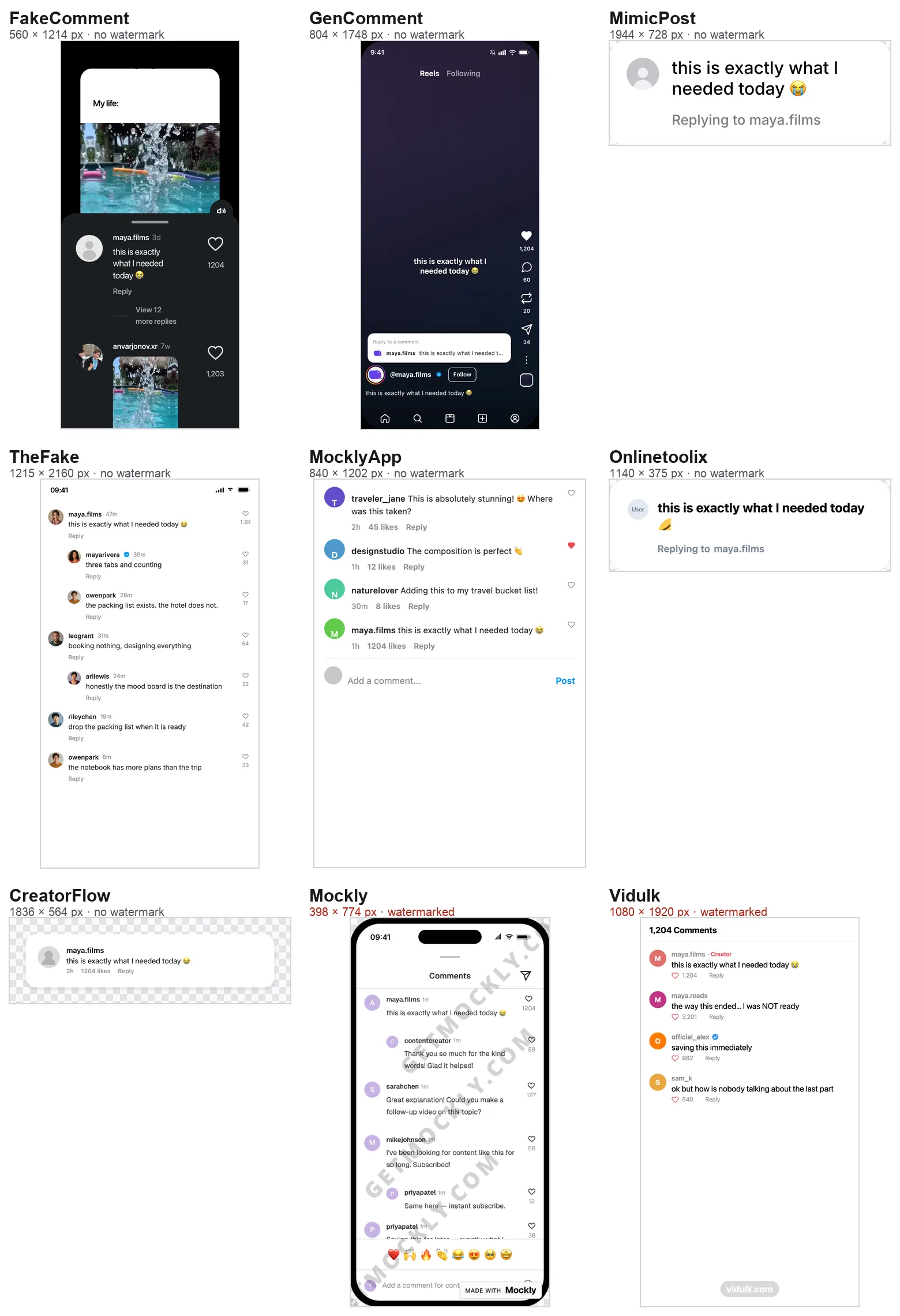
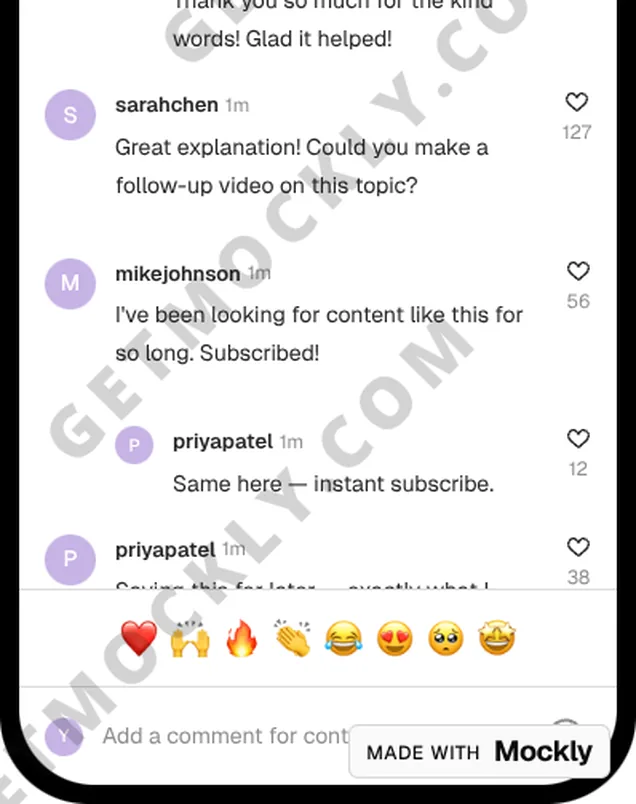
Seven of the ten tools I tested gave me a clean, watermark-free PNG without an account: GenComment, MimicPost, TheFake, MocklyApp, CreatorFlow, Onlinetoolix and FakeComment. Mockly and Vidulk watermark the free image. TryMyPost watermarks its free download and asks you to accept its terms before you get it.
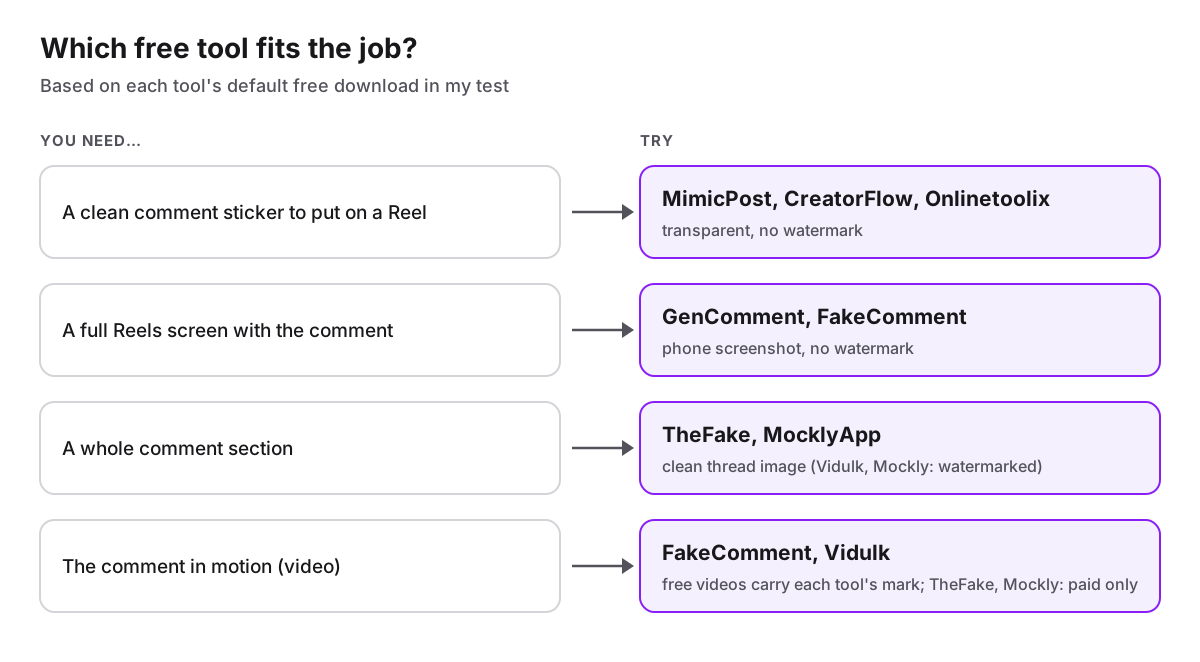
For a transparent sticker, MimicPost and CreatorFlow gave the cleanest, largest files. For a full Reels screenshot, GenComment and FakeComment. For a comment section, TheFake. For a free video, FakeComment and Vidulk, both with a small mark on the free version.
I build FakeComment, one of the tools in this test. I've tried to report it the same way as the others, including where it came out behind.
How I tested
On October 1, 2026, in a signed-out Chrome window on a Mac, I opened each tool and made one comment: username maya.films, text "this is exactly what I needed today 😭", 1,204 likes where the tool had a likes field. I left every other setting at its default, clicked the main free download once, and did not sign up, enter an email or accept a trial anywhere. Then I opened each file and checked its pixel size, whether it has a transparent background, and whether any logo or brand text is on it.
Prices are as shown on each site on that date. Tools change, so check the current page before you rely on a limit or a price.
Which free Instagram comment generators add a watermark?
| Tool | Account needed | Watermark on the free PNG | What the free PNG is | Video | Paid plan |
|---|---|---|---|---|---|
| GenComment | No | None | Full Reel screen, 804 × 1748 | Not offered | Pro $7.99/mo |
| MimicPost | No | None | Transparent reply sticker, 1944 × 728 | Not offered | Pro mentioned, no price shown |
| TheFake | No | None | Comment thread, 1215 × 2160 | Pro only | $4.99 for 7 days, $7.99/mo, $49 lifetime |
| MocklyApp | No | None | Comment list, 840 × 1202 | Not offered | None |
| CreatorFlow | No | None | Transparent comment card, 1836 × 564 | Not offered | Free tool |
| Onlinetoolix | No | None | Transparent "Replying to" card, 1140 × 375 | Not offered | None |
| FakeComment | No | None on images | Phone screen with the Reel, 560 × 1214 | Free 3-second green-screen clip, small corner mark | Pro $6.99/mo, $29/yr, $99 once |
| Vidulk | No | vidulk.com label | Comment thread, 1080 × 1920 | Free with watermark | Code from $9, one-time |
| Mockly | No (free exports are limited) | GETMOCKLY.COM across the image, plus a badge | Phone screen, 398 × 774 | Paid | $12.99 for 7 days, $69 for a year |
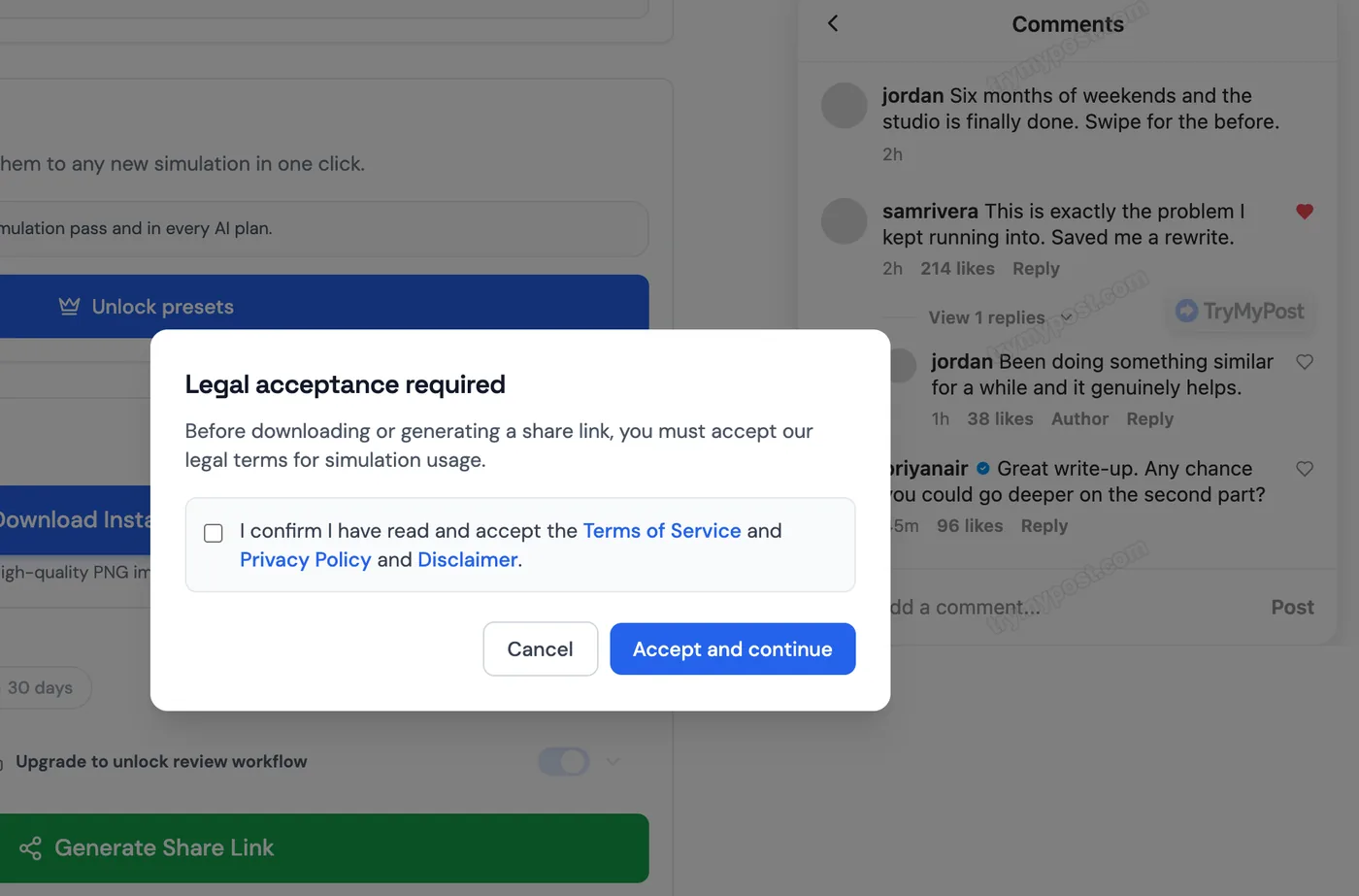
| TryMyPost | No, but you must accept its terms first | Watermarked (its own download panel says so) | Comment section | Not offered | $3.99 for 5 clean exports, $4.99/mo |

Which ones make a transparent comment sticker?
The "replying to a comment" hook on Reels uses a single comment on a transparent background. Three tools export exactly that by default:
- MimicPost: a white reply sticker with "Replying to maya.films" under the text, 1944 × 728. The editor had picture, username, comment and badge; there was no likes field, although the page mentions likes.
- CreatorFlow: a white comment card with the username, likes and Reply, 1836 × 564.
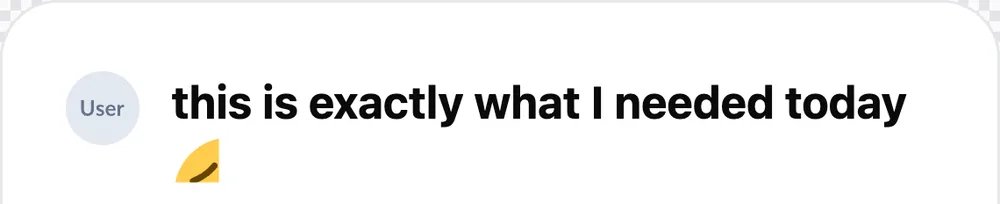
- Onlinetoolix: a "Replying to" card, 1140 × 375. The crying-face emoji at the end of my comment came out cut off:
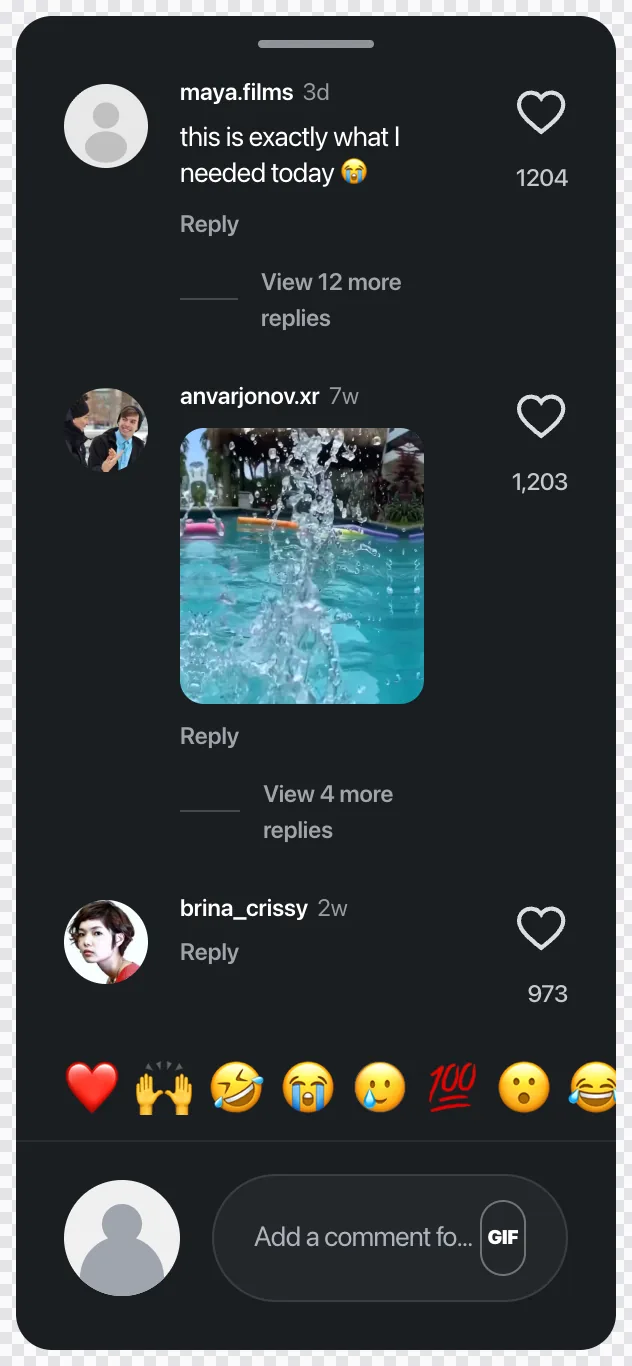
GenComment's page describes a transparent comment-only export too, but its default download was the full Reel screen, so that's what I compared. FakeComment has a Comment Only mode that exports the dark comment sheet with transparent rounded corners:
Which ones make a full Reels screenshot or a comment section?
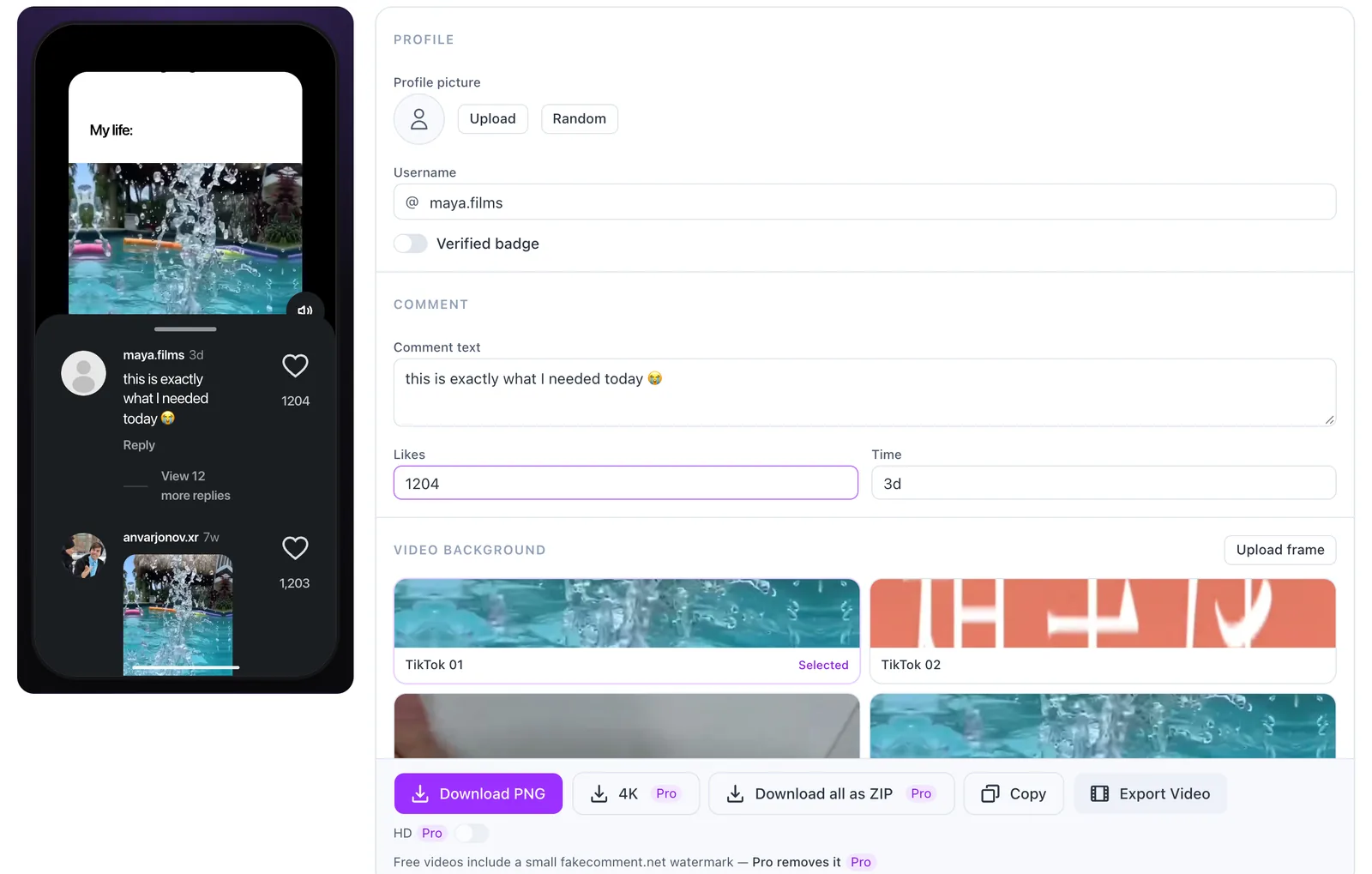
Full Reels screen. GenComment's default download is a dark Reels screen with the comment shown as a reply sticker, the caption and the action column, 804 × 1748. Its default profile picture is GenComment's own logo artwork, so upload an avatar before you export. FakeComment's default is a phone screen with the Reel at the top and Instagram's comment sheet below, 560 × 1214. You can upload your own frame as the Reel.
Comment section. TheFake's free download is the whole thread on a white background, 1215 × 2160, with replies, likes shown as "1.2K", and no watermark. MocklyApp gives a simpler white list, 840 × 1202; its editor had username, time, likes and text, with letter avatars, although its page also lists replies, verified badges and avatar upload. Vidulk's thread looks good at 1080 × 1920 but carries its label.
How big is the free download?
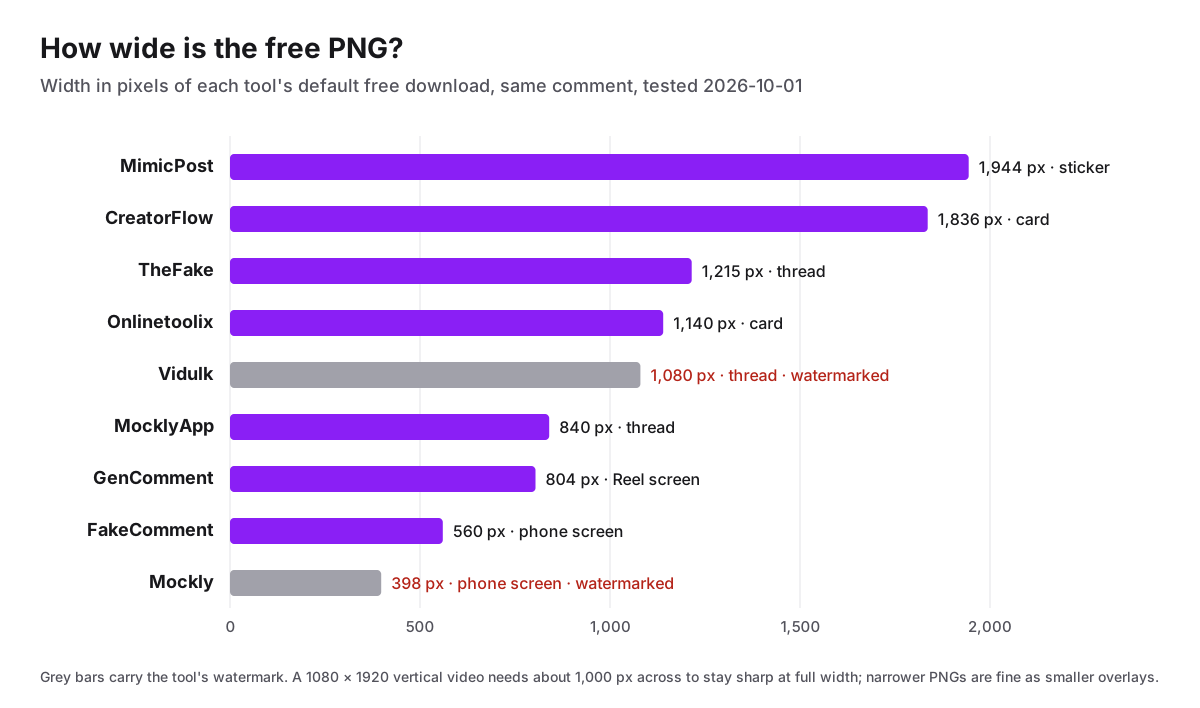
Size matters most when the PNG fills the frame. FakeComment's free phone screenshot is the second smallest here; it is sharp as a picture-in-picture or a slide image, but if you scale it to fill a 1080 × 1920 video it will soften. Its 4K export is part of Pro. MimicPost and CreatorFlow give the most pixels for a sticker.
Can you make a fake Instagram comment video for free?
Two of the ten do it on the free tier, both with a mark:
- FakeComment exports a 3-second green-screen clip in which the mockup pops in (the phone screen, or just the comment sheet in Comment Only mode), ready for a chroma key in CapCut or Premiere, with a small fakecomment.net mark in the corner. The CapCut overlay tutorial shows how to key and place it.
- Vidulk offers a comment video with its watermark; a one-time code from $9 removes it.
TheFake (Pro) and Mockly (paid passes) keep video export for paying users.
Which one should you pick?
If you also need the comment text itself, FakeComment's AI comment writer writes comments in Instagram's voice from a topic (20 a day free), and GenComment has a "Write with AI" button with a small free daily allowance. For an Instagram mockup with the post above the comments, FakeComment's Instagram comment generator and GenComment's Reel export both include the Reel.
Scope
I tested each tool once, signed out, with default settings, on October 1, 2026. Limits, prices and features change; the table reflects what I saw that day, and claims about plans come from each tool's own pages. I build FakeComment, so read its rows with that in mind. All of these tools make mockups: use them for concepts, skits, parody and teaching, not to impersonate real people or to pass made-up comments off as real. None of them, FakeComment included, is affiliated with Instagram.
Frequently asked questions
Is there a free fake Instagram comment generator without a watermark?
Yes. In my October 2026 test, GenComment, MimicPost, TheFake, MocklyApp, CreatorFlow, Onlinetoolix and FakeComment all gave me a free PNG with no watermark and without an account. Mockly and Vidulk put their name on the free image, and TryMyPost's free download is watermarked.
Do I need an account to make a fake Instagram comment?
Not for any of the ten tools I tested. TryMyPost was the only one that stopped me before the download: it asks you to tick a box accepting its terms, privacy policy and disclaimer first. Mockly showed '1 free export left', so its free downloads are limited.
Which free tool makes a transparent Instagram comment sticker?
MimicPost, CreatorFlow and Onlinetoolix export a transparent comment card by default. In my test Onlinetoolix clipped the crying-face emoji at the end of the comment, so check emoji before you use it. FakeComment's Comment Only mode exports the comment sheet with transparent corners.
Can I make a fake Instagram comment video for free?
FakeComment exports a free 3-second green-screen video in which the mockup pops in, with a small fakecomment.net mark in the corner. Vidulk also offers a free video with its watermark. TheFake and Mockly keep video export for paid plans.
Which free fake Instagram comment generator has the highest resolution?
Of the clean free downloads in my test, MimicPost's sticker was the widest at 1,944 px, then CreatorFlow at 1,836 px and TheFake at 1,215 px. FakeComment's free phone screenshot was 560 px wide; its 4K export is part of Pro.
Is it okay to make fake Instagram comments?
For mockups, pitch decks, skits, parody and teaching, yes. Don't use them to impersonate real people, to fake reviews or testimonials, or to pass a made-up comment off as real.
Try the Related Tools
Related Guides
More how-tos on comment stickers, overlays, and mockups.
How to Make a Fake Live Chat for a YouTube or Twitch Video (Free)
Make a fake YouTube live chat or Twitch chat for a video: write the messages, export a scrolling chat video or a transparent overlay, and key it into iMovie, CapCut, Premiere, DaVinci Resolve or OBS. Tested step by step.
TokComment Alternatives: 5 Free TikTok Comment Generators Compared (2026)
An honest comparison of TokComment alternatives in 2026: FakeComment, Postfully, GetMockly, TheFake.design, and EasyComment — compared on comment threads, AI writing, export options, pricing, and platform coverage.
How AI Fake Comment Writers Work (And When to Use One)
How AI fake comment writers actually work under the hood, what makes a good prompt, when to use them instead of writing manually, and how to pipe the output into a screenshot mockup tool.